> For the complete documentation index, see [llms.txt](https://kr-docs.aftermath.finance/llms.txt). Markdown versions of documentation pages are available by appending `.md` to page URLs; this page is available as [Markdown](https://kr-docs.aftermath.finance/undefined/creating-a-sui-account-with-zklogin/zklogin/removing-a-zklogin-account.md).

# zkLogin 계정 삭제

이전에 설정한 zkLogin 계정과 관련 데이터를 Aftermath에서 모두 삭제하려면 다음 단계를 따릅니다.

1. 사이트 오른쪽 상단의 지갑 드롭다운 버튼을 클릭합니다.

<figure><img src="https://1494121871-files.gitbook.io/~/files/v0/b/gitbook-x-prod.appspot.com/o/spaces%2FtBWRI3CUEvo6lk7n5GNW%2Fuploads%2Fgit-blob-739ad9cf783c280fd0813a534082541c56a37d1c%2FScreenshot%202025-02-19%20at%2010.07.52%E2%80%AFPM.png?alt=media" alt=""><figcaption><p>Login/Connect를 클릭합니다(이미 로그인되어 있다면 이 자리에 주소가 표시됩니다).</p></figcaption></figure>

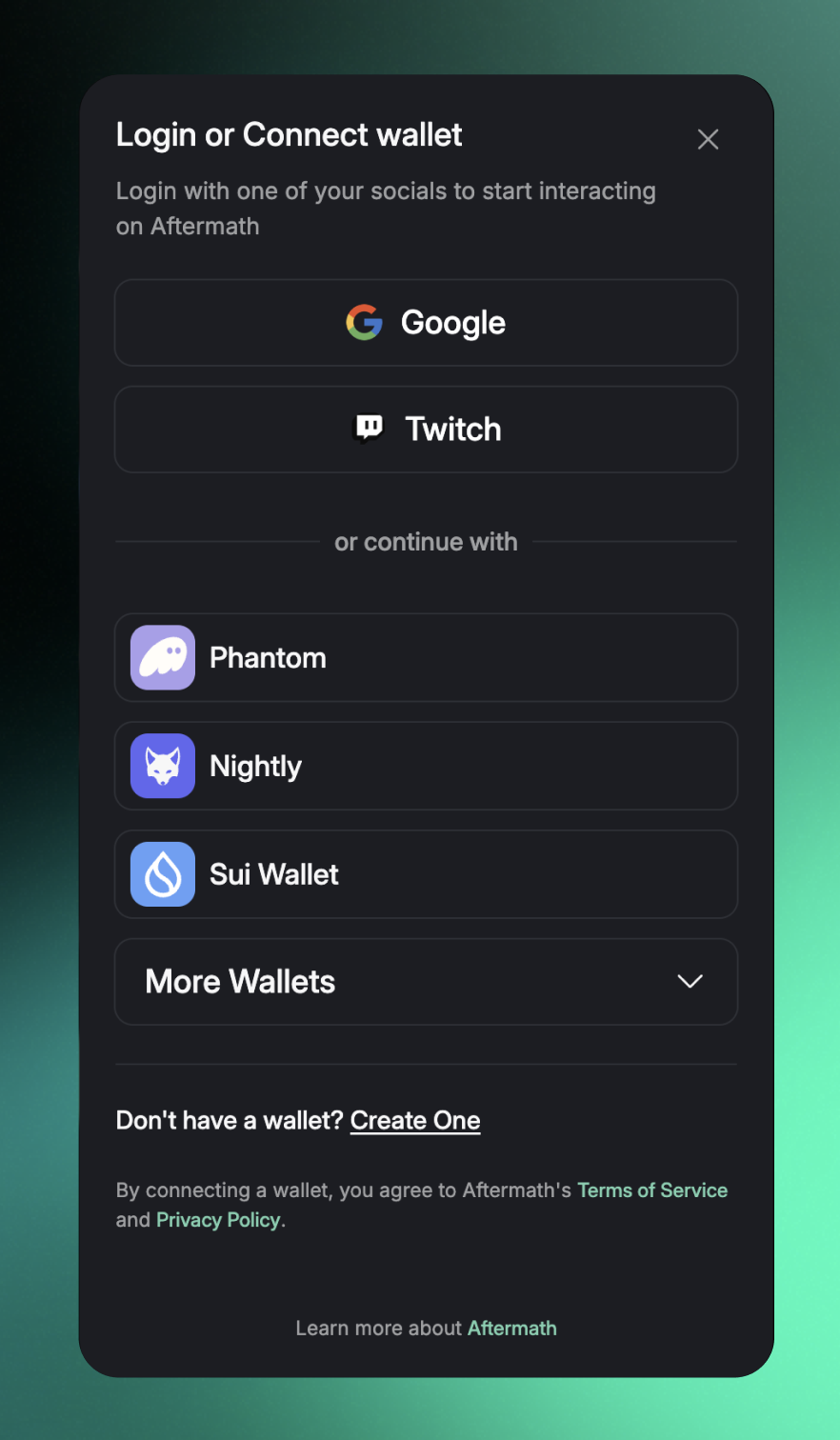
2. 삭제할 주소의 로그인 방식(Google 또는 Twitch)을 클릭합니다.

<figure><img src="https://1494121871-files.gitbook.io/~/files/v0/b/gitbook-x-prod.appspot.com/o/spaces%2FtBWRI3CUEvo6lk7n5GNW%2Fuploads%2Fgit-blob-219d0a29e581cf24f2ba66266f10bd7232c65a24%2FScreenshot%202025-02-19%20at%2010.11.40%E2%80%AFPM.png?alt=media" alt="" width="375"><figcaption><p>지갑 연결 모달</p></figcaption></figure>

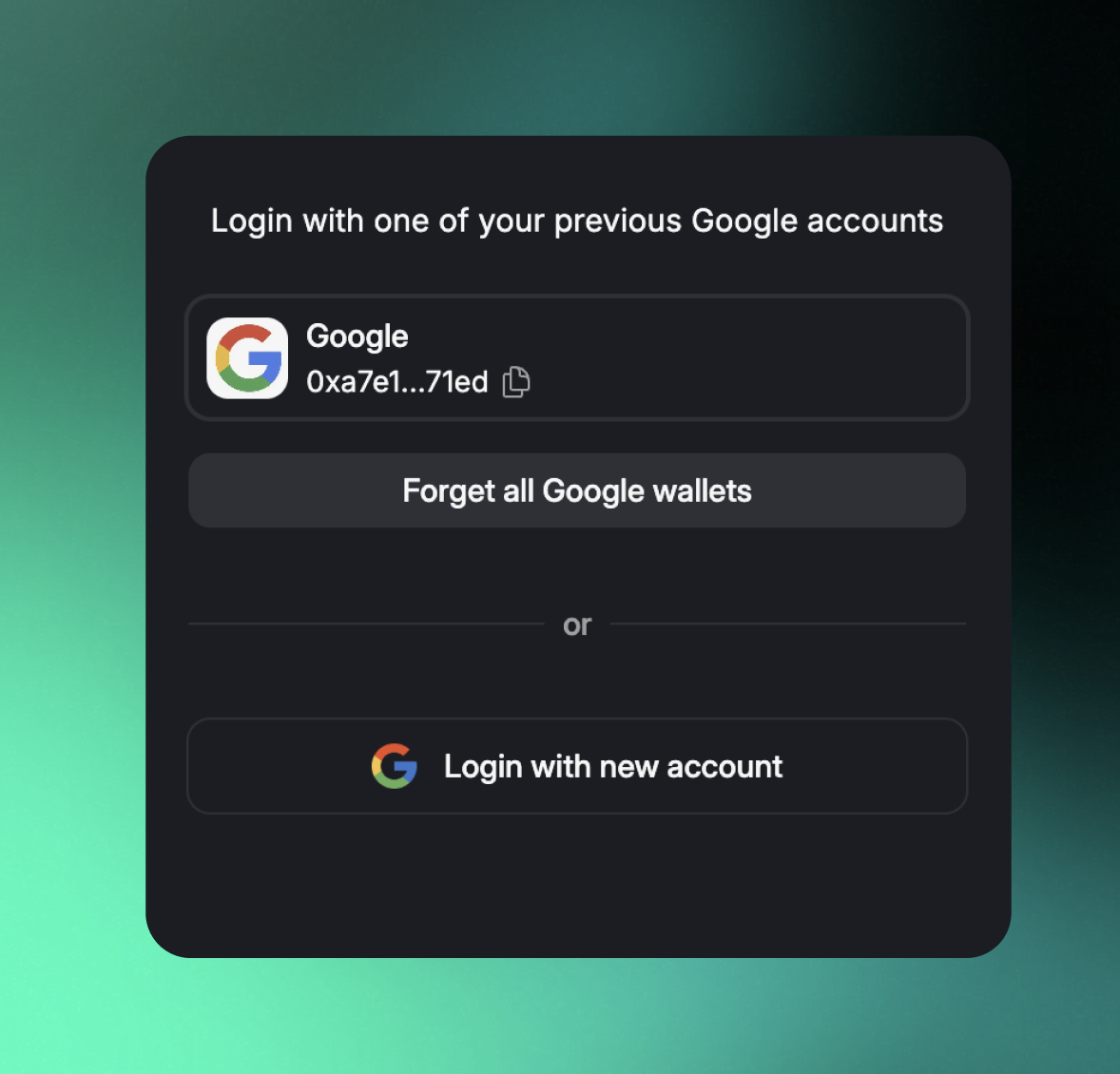
3. "Forget all Google/Twitch wallets"를 클릭합니다.

<figure><img src="https://1494121871-files.gitbook.io/~/files/v0/b/gitbook-x-prod.appspot.com/o/spaces%2FtBWRI3CUEvo6lk7n5GNW%2Fuploads%2Fgit-blob-de5806f41e25ee1984990673dddd4a4a64ddae9c%2FScreenshot%202025-02-26%20at%208.47.01%E2%80%AFPM.png?alt=media" alt="" width="375"><figcaption><p>지갑 삭제</p></figcaption></figure>

이것으로 끝입니다. 이 과정은 되돌릴 수 없으므로, 진행하기 전에 해당 지갑을 정말 삭제할 것인지 확인해야 합니다. 또한 zkLogin은 다른 디앱(dApp)이나 지갑 등 다른 서비스를 통해서도 만들 수 있는데, 이 과정은 그런 계정에는 영향을 주지 않으며 Aftermath에서 생성한 계정만 삭제합니다. 궁금한 점이 있으면 Discord로 문의해 주시면 기꺼이 도와드리겠습니다.